
Run every project on one Alfresco-based EDMS with standard folders, auto-numbering, controlled reviews and traceable transmittals. Keep the MDR live, work in ISO 19650 CDE states, and turn legacy P&IDs into searchable asset data with IndustrialDocs AI, on-premise or in your private cloud.
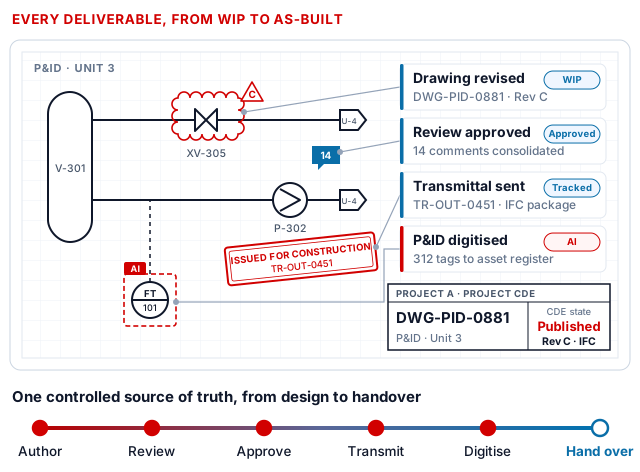


WIP, Shared, Published and Archived, with controlled gates
incoming, outgoing and internal, with generated cover sheets
for every project, discipline, contractor and vendor
digitised into searchable, linked engineering data
Capabilities of Engineering EDMS and IndustrialDocs AI. CDE states and status codes are configured to your project information standard.
Control revisions, reviews and transmittal cycles across disciplines without spreadsheet chaos.
Enforce naming, numbering and approvals consistently on every project, and prove what was approved and issued.
Replace per-project tools and shared drives with one secure repository inside your own boundary.

Owner, contractor, vendor and discipline visibility through role-based access, with every view, download and change in the audit trail.
Major and minor revisions, supersede rules and a clear latest-approved version, so nobody builds from a superseded drawing.
Full-text and metadata search across documents and drawings, with optional AI-assisted retrieval that respects the same permissions.
Close out projects into governed records with retention and legal holds, so as-built documentation stays available to operations.
Multi-project lifecycle management, standard project templates, auto-numbering, check-in and check-out, revision and supersede rules, renditions for viewing, and bulk upload with metadata validation.
Role-based review routes, due dates and approval gates, annotation and comment consolidation, incoming and outgoing letters and memos linked to deliverables, tags and deadlines.
MDR and SMDR registers, transmittal registers, overdue and at-risk views, and exports to Excel, with APIs for project controls dashboards.
Alfresco Content Services stores documents and versions, Process Services runs reviews and transmittals, and Governance Services applies retention to closed-out projects.
Replace manual cover sheets and email approvals with controlled, traceable processes. Incoming, outgoing and internal transmittals and project correspondence are linked to the exact document and drawing revisions they carry, so disputes about who sent what are settled in seconds.

Generate cover sheets from your template, apply distribution lists, track acknowledgements and resend only what changed.
Role-based review routes with due dates, approval gates and review codes, designed for multi-party EPC delivery.
Consolidate annotations from every reviewer into one comment sheet, assign responses and close the cycle with traceability.

WIP, Shared, Published and Archived states with controlled transitions, so information is only shared or published after the right check.
Naming fields, status and suitability codes, revisions and permitted use, aligned to your exchange information requirements (EIR) and BIM execution plan (BEP).
Review and authorisation gates before content is shared or published, giving QA assurance and contractual clarity.
Status codes shown follow the UK National Annex convention as an example. Compliance depends on your project requirements and configuration; Crest implements templates aligned to your agreed conventions.
Track deliverables across disciplines, contractors and vendors with live status, revision, review outcome and transmittal history, without reconciling spreadsheets before every progress meeting.

Status by phase, discipline and contractor, with each line linked to the authoritative document or drawing.
See what each vendor submitted, when, to whom and at which revision, tied to transmittals and correspondence.
Overdue and returned items surface automatically, and registers export to Excel or feed project controls through APIs.
Decades of plant knowledge sit in P&IDs, single-line diagrams and BoMs that nobody can search. IndustrialDocs AI reads them, extracts tags and references, and builds an asset register in which every tag links back to the drawing and revision it came from, so engineers, maintenance and handover teams find answers in seconds.

Equipment, instrument and valve tags, line numbers, off-page references and title-block data read from scanned or native drawings.
Every result carries a confidence level; uncertain items queue for engineer validation before they reach the asset register.
Multi-tenant and organised by project, with role-based access for engineering, document control and operations teams.
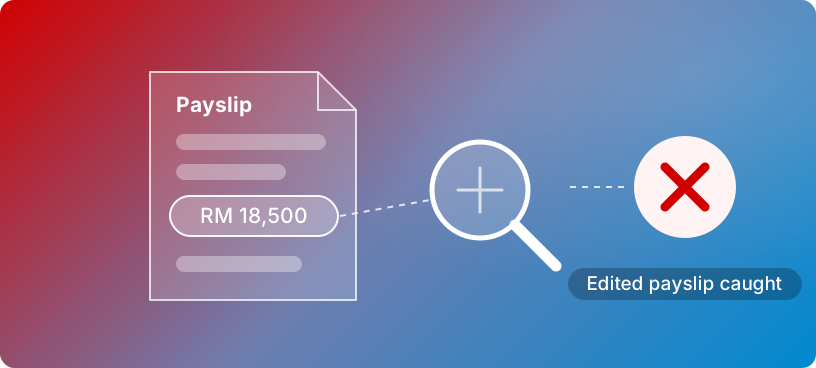
Pair it with iVerifier eKYC: when the document is an ID, iVerifier also checks that it is genuine and that its holder is present, with face match and passive liveness.
Teams evaluating Oracle Aconex or a standalone engineering data platform often want both: disciplined document control and usable drawing data, in a repository the owner or contractor controls after the project ends.
| Consideration | Crest Engineering EDMS + IndustrialDocs AI | Project-hosted SaaS CDE (e.g. Oracle Aconex) | Standalone engineering data platform |
|---|---|---|---|
| Where it runs | On-premise, private cloud or Kubernetes, inside your boundary | Vendor-hosted cloud | Usually vendor-hosted cloud |
| Scope of the repository | One enterprise repository across all projects | Typically organised project by project | Typically organised by asset or facility |
| After project closeout | Records stay live, with retention and legal holds | Project archive exported or retained by contract | Varies by product and contract |
| Numbering, transmittals, review routes | Configured to your procedures and templates | Configured within the platform’s model | Not usually the core focus |
| P&ID, SLD and BoM digitisation | IndustrialDocs AI, linked to the EDMS revision | Usually through add-ons or partners | Often the core focus |
| Platform foundation | Alfresco, with open APIs and standards such as CMIS and REST | Proprietary platform with APIs | Proprietary platform with APIs |
Comparison reflects typical approaches; capabilities vary by product, edition and contract. Oracle and Aconex are trademarks of Oracle and/or its affiliates. Crest Engineering EDMS can also work alongside a client or joint-venture CDE.
Compliance depends on your policies, configuration, operating procedures and audits. These platforms provide controls and evidence that support your compliance programme.
ISO 19650 information management and CDE workflows on BIM projects; ISO 9001 control of documented information; contractual document control procedures and client handover specifications, such as CFIHOS-based requirements; and data-protection and data-residency rules in each country of operation.
Folder templates, numbering rules, transmittal workflows, review gates and CDE states mapped to your execution model, EIR and BEP.
One live project configured and running in weeks, with your document controllers, reviewers and contractors on the platform.
Templates rolled out across projects and sites, legacy drawings digitised with IndustrialDocs AI, and integrations to ERP and EAM.
Alfresco expertise you can verify: Crest Infosolutions received Hyland’s Solution Builder Partner Award for Alfresco, with delivery teams in Malaysia, Singapore, Indonesia and India. Read the announcement
Practical answers for engineering, document control, QA and IT teams.
An engineering document management system controls the documents and drawings a project produces and receives: numbering, revisions, reviews, approvals, transmittals, correspondence and the deliverables register. Crest Engineering EDMS runs every project on one Alfresco platform with standard folder templates, auto-numbering, role-based access and a complete audit trail, so the latest approved revision is always clear.
The MDR (master deliverables register, or master document register) lists every deliverable the project must produce, with its discipline, status, revision and due date. The SMDR (supplier master document register) tracks the documents vendors and subcontractors must submit. In Crest Engineering EDMS both registers update from review workflows and transmittals, so each line shows what was submitted, when, to whom and at which revision.
A transmittal is the formal, numbered record that documents or drawings were sent from one party to another, listing each item, its revision and its purpose, such as for review or issued for construction. Crest Engineering EDMS handles incoming, outgoing and internal transmittals, generates the cover sheet from your template, sends to the distribution list and tracks acknowledgements.
Crest configures ISO 19650 common data environment patterns: work in progress, shared, published and archived states, approval gates between them, and naming, status and revision metadata on every information container, aligned to your EIR and BEP. Compliance itself depends on your project requirements, procedures and configuration, so we implement templates that match your agreed conventions.
Yes, for owners, operators and EPC contractors that want one enterprise repository for every project, deployed on-premise or in their own private cloud, with records that stay live after project closeout. Project-hosted SaaS CDEs such as Oracle Aconex are widely used for joint-venture collaboration; Crest Engineering EDMS can also work alongside one, registering transmittals received from a client or partner platform in your own controlled record.
IndustrialDocs AI reads P&IDs, single-line diagrams, bills of materials and other engineering drawings, recognises equipment, instrument and valve tags, extracts title-block data and line references, and builds an asset register in which every tag links back to the drawing and revision it came from. Engineers confirm low-confidence results in a validation queue before data is published.
Yes. IndustrialDocs AI works on scanned and native PDF drawings. Scan quality and drafting standards affect confidence, which is why each result carries a confidence level and anything uncertain goes to an engineer for review rather than straight into the asset register.
Yes. Both solutions expose REST APIs, Alfresco offers a content connector for SAP applications, and asset data can be exported to EAM and CMMS systems such as SAP Plant Maintenance or IBM Maximo, or to Excel. Design teams keep their authoring tools; the EDMS controls the files and revisions they produce.
Yes. Crest Engineering EDMS runs on Alfresco on-premise, in a private or public cloud, or on Kubernetes, with single sign-on through your identity provider, so project and asset data stays inside your security and residency boundary. Crest confirms the hosting model for IndustrialDocs AI with you.
Crest maps your folder templates, numbering rules, transmittal workflows and review gates to your execution model, then delivers a pilot on one live project in weeks, ready to scale across your programme. IndustrialDocs AI can start with a sample set of your P&IDs.
Bring your numbering rules, a transmittal and a sample P&ID, and we’ll show them working end to end in a 30-minute walkthrough.
Revisions · reviews · MDR
Numbering · approvals · audit
Hosting · SSO · integrations
P&ID · SLD · BoM · asset register
Tell us what your projects need.
Opens your email application with a draft to review and send. Use the online contact form if you prefer.

Request for information or schedule a solution demo.